Simplify and Track Every Link with a Branded URL Shortener

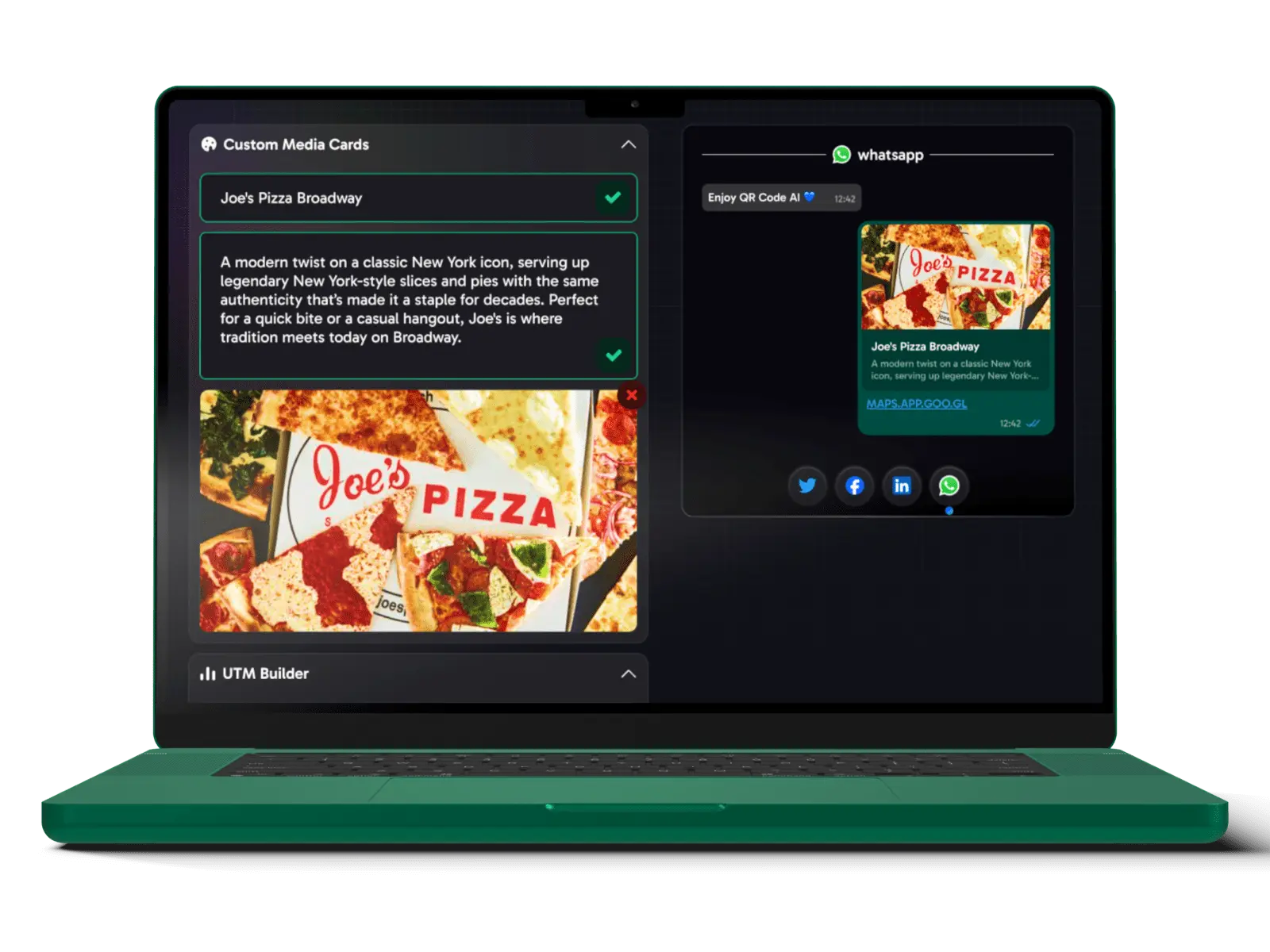
Convert long, unmanageable URLs into custom-branded short links. Optimize your links with personalized previews, clear link labeling, and smart redirections for App Store and Play Store. Increase user trust and track your link's performance across all platforms.

Laptop showing branded link customization and social media previews

Why Use a Branded URL Shortener

A Branded URL Shortener creates memorable, easy-to-share links by incorporating your brand name or branded labels. This gives your links a professional look and reinforces brand awareness, making them ideal for marketing on social media, email campaigns, or affiliate marketing. Use it to track link performance and drive higher engagement. Branded short links help businesses gather valuable insights on link performance while reinforcing brand identity across every channel.

Secure branded URL and QR code links
Shorten Your Links Now

Elevate Your Branded Links with Custom QR Code Art Designs

Combine the power of Branded Short URLs with Artistic QR Codes and Custom QR Codes to enhance your marketing efforts. Together, these tools allow you to create visually compelling, fully customizable QR codes with logos, colors, and shapes that align with your brand. Branded short links add a professional touch, boosting user engagement across both digital and print platforms, while offering an easy-to-share, trackable URL.

Custom QR Code Generator

Create QR Codes with custom photos, shapes, logos, gradient backgrounds, images, transparent elements, and colors for branding.

Custom QR Code Generator

QR Code Art Generator

Transform classic QR code designs into stunning, artistic, and fully scannable QR codes with AI. Use templates or prompt your creative ideas.

QR Code Art Generator

design and design preview

Use our Free QR code Tracker to monitor scans and Branded URLs in real-time. keep destination details clear, device type, and link performance with clean link previews.

design and design preview

Frequently Asked Questions About Branded URL Shorteners

What is a Branded URL Shortener?

A branded URL shortener allows you to create shortened links using your own branded labels. This makes your links more recognizable and trustworthy, increasing brand awareness and click-through rates. With QR Code AI's branded short links, you can also track link performance and customize the preview image and title for better engagement across platforms.

What are the benefits of using branded short links?

Branded short links help build trust by using your branded labels, making them easily recognizable. They also improve SEO by associating your brand with shared content. Additionally, they provide detailed scannable previews, allowing you to keep links readable, conversions, and engagement through descriptive labels. With QR Code AI, you can customize link previews, ensuring they are visually appealing and aligned with your brand.

How do I shorten a URL using QR Code AI?

To shorten a URL, simply input the long link into the branded URL shortener tool provided by QR Code AI. You can then customize the short link with your branded domain, and add descriptive labels for design purposes. Once shortened, your link is ready to be shared across social media, emails, or websites.

How do I customize the preview image, title, and description of a link?

QR Code AI's branded URL shortener allows you to edit the image, title, and description that appear when your link is shared on social media platforms such as Facebook or Twitter. This is done through the link management interface, where you can upload your preferred image and edit the meta-information for a more engaging and relevant preview.

Can I review the design of my branded short links?

Yes, QR Code AI provides built-in design preview to review the design of your branded short links. By using descriptive labels, you can monitor clicks, user engagement, and conversion rates in real-time. This data helps you optimize your marketing campaigns and understand how users are interacting with your links.

What is the difference between branded and unbranded links?

Branded links use your branded labels (e.g., links.yourbrand.com), making them more recognizable and trustworthy. Unbranded links, on the other hand, use generic domains provided by URL shortener services (e.g., bit.ly or tinyurl.com). Branded links are more professional and help reinforce brand identity, whereas unbranded links are less likely to be associated with your business.

Can I add a branded labels to my shortened links?

Yes, QR Code AI allows you to add a branded labels to your branded short links. This feature helps to reinforce your brand's identity and makes your links more memorable. Setting up a branded labels is simple and ensures that your audience can easily identify your content across various platforms.

How do I manage my branded short links?

QR Code AI's link management workspace allows you to edit, update, and organize your branded short links. You can filter links by adding tags and titles, track performance metrics, and modify the destination URLs or preview content whenever needed. This ensures that your links stay optimized and aligned with your campaigns.

Can I use branded short links for affiliate marketing?

Yes, branded short links are well suited for affiliate marketing. They allow you to keep links readable and conversions, ensuring that your affiliate campaigns are effective. By using your own domain, branded short links increase trust and click-through rates, making it easier for users to engage with your content.

Do branded short links expire?

No, branded short links created with QR Code AI do not expire. Unlike some free URL shorteners, your branded links remain active indefinitely, ensuring they are always accessible to your audience. You can also manage and update your links through the workspace at any time.

How to change the link preview image on Facebook?

To change the link preview image on Facebook, you can use QR Code AI's branded URL shortener. By customizing the preview content in the workspace, you can select or upload an image that will be displayed when the link is shared on Facebook. This feature allows you to make your links visually engaging and aligned with your brand messaging.

How to shorten Amazon links?

Shortening Amazon links with QR Code AI is easy. Simply paste your long Amazon URL into the branded shortener tool. You can customize the short link with your own domain and review the design of the link using descriptive labels. This is especially useful for affiliate marketers who want to make their links more user-friendly and professional.

How to shorten a link for Instagram?

To shorten a link for Instagram, use QR Code AI's branded URL shortener to create a clean, branded link that fits perfectly in your Instagram bio or posts. Instagram doesn't support clickable links in captions, so using a branded short link in your bio helps direct followers to important pages or offers. You can also improve engagement with descriptive labels.

How to shorten Spotify links?

Shortening Spotify links with QR Code AI's branded URL shortener is simple. Just paste the long Spotify URL into the tool, and create a customized, branded link. This helps artists, podcast creators, and influencers make their Spotify links more memorable and trackable. Perfect for sharing on social media or websites.

How to shorten a link in notes or emails?

You can shorten a link for use in notes or emails by pasting your long URL into QR Code AI's branded URL shortener. The branded short link not only makes the URL easier to read but also more professional, which is perfect for email marketing or sharing quick notes. The short link ensures it doesn't take up too much space and remains user-friendly.

How to shorten a Zoom link?

QR Code AI allows you to shorten long Zoom links by using its branded URL shortener. Simply paste the Zoom invitation link into the shortener, and you can create a neat branded short link, perfect for sharing with clients or colleagues. You can also keep links readable and user engagement, making it easier to manage Zoom meetings.

How to shorten a LinkedIn URL?

To shorten your LinkedIn URL, paste the long profile or company page URL into the QR Code AI branded URL shortener. The resulting branded short link is ideal for sharing your LinkedIn profile across various platforms while maintaining a professional appearance. Additionally, you can track how many people click on your profile.

Boost Engagement with Custom Branded Short Links

Empower your marketing with branded links that combine easy sharing, design, and customization. Create short links that reflect your brand's identity and track their performance with detailed design preview. Ideal for boosting visibility across all your digital platforms.

Customize Your Link Now